


Buz Tv Football & Sports Score
4.01.00 Reviews
App Specs
- Version
- 1.0.0
- Updated On
- License
- Free
- Downloads
- 50,000+
- Developer
- Olivier Genin LTD.
- Categories
- Sports
- Platform
- Android
Screenshots
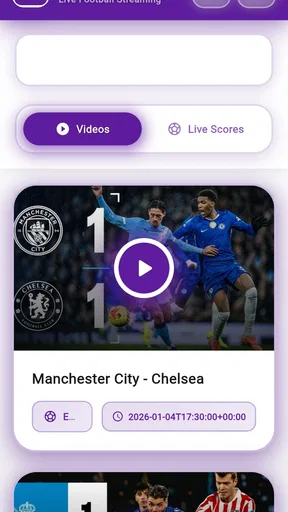
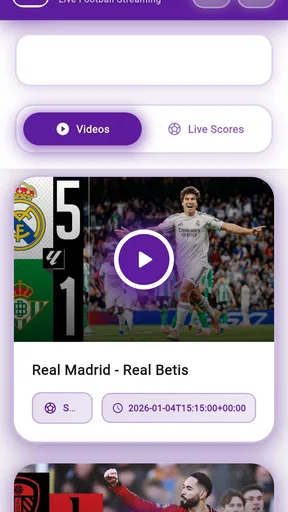
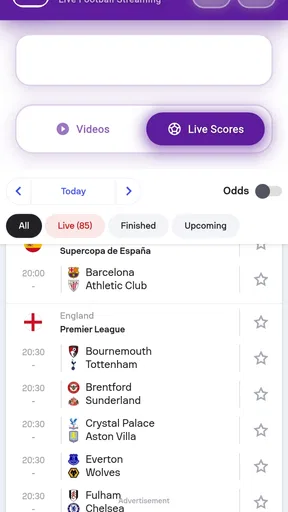
 Analysis by AppCompare
I keep checking football scores at awkward moments: while waiting for a bus, between errands, or when a match is on but I can’t sit down to watch. That is the kind of gap Buz Tv Football & Sports Score is meant to fill. Its appeal is straightforward: have sports information close at hand, then dip in when time allows. I’d treat it as a companion for keeping up, rather than assume it can replace watching a match or a dedicated live-broadcast service.
What to expect when opening it
The first thing I look for in a score app is whether I can get to the match I care about without digging through clutter. A clean, direct layout matters more to me than lots of panels competing for attention. The app’s name points to football and live-score viewing, but I would still make a quick check of the available competitions and coverage before relying on it for a less-followed league or a particular fixture.
There is a useful distinction between speed on screen and the speed of the underlying information. A score can appear quickly once an app is open, while the timing of the source feed may vary. For a casual check, that difference may not matter. If I were following a close finish or making decisions that depend on an exact live state, I’d compare the displayed score with another trusted source rather than treat any single phone app as an unquestionable referee.
How it fits into a match-day routine
For a realistic everyday use, imagine I’m on my way home while a match is in progress. I can check the current score during a safe pause, then return to what I was doing instead of keeping a stream open and watching the battery drain. That quick-check habit is where a sports app can be more practical than a television or video service: I need a compact update, not a full broadcast.
A small planning tip is to decide what I actually want to follow before kickoff. If I care about one team, I can make that the focus and avoid repeatedly browsing unrelated fixtures. If I’m checking several matches, I’d use a short routine—look at the scores, note which game needs attention, then close the app—rather than leave it active in the background. This keeps the phone available for messages, maps, and other everyday tasks.
Notifications can be helpful when I cannot watch, but they are not automatically better in larger numbers. I’d keep alerts limited to matches I genuinely care about, especially on a busy day. Too many score prompts can turn a convenient check-in into a stream of interruptions; a single important alert is more useful than being notified about every game I never planned to follow.
Where it differs from other sports options
Compared with a broad sports-news app, a football-and-score-focused tool can make sense when my main question is simply what is happening in a match. A general news app may be better when I want a wider mix of reporting and headlines, while a league’s own service may suit someone who wants information centered on one competition. For watching the action itself, a licensed streaming or television option is the more appropriate choice. These tools solve different problems, so I would choose based on whether I need a score, a story, or a live picture.
Worth Reading Before You Choose

Flipboard Shows What News Apps Must Do Beyond the Feed

Switching to Android Auto Means Rethinking Your Driving Routine

Google Calendar Makes a Crowded Week Easier to Manage

Ludo King Makes the Most of the Minutes Between Plans

Baby Panda World Brings Quick Play to Modern Phones, but Its Game Library Feels Busy

ESPN’s Live Game View Makes Following Close Games Easier
The “live score” part of the name can also create an expectation worth checking: a score-focused experience is not automatically the same as live video. I would not install it assuming every match is available to watch. If viewing is the priority, I’d confirm what the app actually offers on my device before planning a match night around it; if the priority is staying informed while away from a screen, a quick score check may be enough.
Who is likely to get the most from it
I’d consider it for a football follower who wants a handy way to keep tabs on matches during commutes, work breaks, or family plans. It may also suit someone who checks scores occasionally and would rather open one focused app than search the web each time. People who follow only one competition should first see whether that competition is covered well enough for their routine.
On the other hand, I would skip it if I need detailed statistics for analysis, extensive editorial coverage, or dependable video access as my main reason for installing. Those needs call for a tool built specifically around that task. A score companion is most valuable when its job stays small and clear; expecting it to be a complete sports newsroom and a broadcast platform at once is a recipe for disappointment.
For anyone deciding whether to try it, the practical questions are simple: does it cover the matches I follow, can I get the kind of update I need, and are its alerts comfortable rather than distracting? I’d answer those by checking a familiar fixture and adjusting my notification habits before relying on it during a busy day. That quick test is more useful than assuming every sports app handles coverage in the same way.
In everyday use, I’d also pay attention to how often I need to reopen it. If I only want occasional updates, a brief visit is likely the sensible pattern. If I’m checking constantly, I’d ask whether a notification or a scheduled check would serve me better. That is less about squeezing every possible feature out of an app and more about keeping score-following from taking over the match—or the rest of the day.
Getting Started with Buz Tv
First things first, downloading the Buz Tv Football & Sports Score app is a breeze. It's available on both Android and iOS, making it super accessible. Once installed, you’re welcomed with a slick interface that's easy on the eyes. It doesn’t overwhelm you with information right off the bat, which is a plus in my book.
After a quick sign-in process, you’re prompted to select your favorite sports and teams. This customization ensures that the app curates content relevant to your interests. I loved that I could tailor my experience without sifting through tons of irrelevant updates.
Speed, features, and match coverage
One of the standout features is the real-time score updates. The app delivers scores faster than you can say "goal!" Seriously, the live updates are impressive, and they cover a wide range of sports. Whether you're into football, basketball, or even cricket, Buz Tv has you covered.
Another cool feature is the notifications. You can set alerts for your favorite matches, so you never miss a beat. This came in handy when I was stuck in a meeting and couldn’t watch the game live. Instead, I got timely updates and felt like I was right there in the stadium.
Reading beyond the score
Apart from scores, the app also offers in-depth analysis and news articles. These aren't just run-of-the-mill updates; they provide real insights into team strategies, player performances, and more. It’s perfect for sports buffs who want to dive deeper into the game beyond just the scores.
The news section is updated regularly, and I found myself spending more time reading up on my favorite teams and players than I initially planned. It’s like having a mini sports encyclopedia in your pocket.
Everyday handling and reliability
Let’s talk design. The app’s layout is intuitive, making navigation a breeze. The menus are well-organized, and everything is just a tap away. The color scheme is vibrant yet not overwhelming, creating a pleasant user experience.
Moreover, the app runs smoothly without any noticeable lags or crashes. That’s a win in my book because there’s nothing more frustrating than an app that crashes right when you need it the most.
In my experience, smooth navigation is most valuable when I’m checking in quickly, not when I’m browsing for its own sake. A match-day rush is a tougher test than opening an app at home: I may be switching between a score, a message, and a map. I’d keep the habit simple and check whether the app returns to the match I was following after I leave and come back. That small detail can make repeated use feel effortless, though I wouldn’t assume it behaves identically on every phone.
For heavy-use moments—several fixtures at once, frequent refreshes, or a long stretch of reading—I’d be more cautious about what any phone app can promise. Network conditions, background activity, and the device itself all affect how quickly information appears and how long a session feels comfortable. I would avoid leaving a score screen open all afternoon if I only need a few updates. Checking, closing, and returning later is a practical trade-off that also leaves the phone free for other tasks.
Reliability matters most at the end of a close game, when a delayed or missed update is frustrating. I’d use the app as a convenient first stop, but if the exact timing or result is critical, I’d verify it with another source. That is not a reason to dismiss the app; it is a sensible approach to live information, where connectivity and feed timing can affect what appears on any screen.
Device requirements are worth considering before installing. The app is free, is rated for Everyone, and its current release is version 1.0.0, with Android support starting at OS 7.0. Olivier Genin LTD. is the developer. Those details make the entry barrier straightforward for a compatible Android device, while iOS users should check the requirements shown for their device before downloading. I would also leave enough free space for ordinary app use and keep the operating system reasonably current, since both are sensible basics for avoiding installation and performance headaches.
The app has a 4.0 average from 214 ratings and has passed 50K+ installs. I read those figures as a modest sign that other people are trying it, not as proof that it will suit every fan or cover every match they follow. I’d still judge it by my own routine: whether the competitions I care about are easy to find, whether the updates feel timely enough, and whether the app stays comfortable to use on my phone.
Final thoughts
All in all, Buz Tv Football & Sports Score is a must-have for any sports fan. It’s like having a personal sports hub at your fingertips. The real-time updates, coupled with insightful analysis, make it a comprehensive tool for staying ahead of the game.
Whether you’re a casual fan or a die-hard sports aficionado, this app will keep you connected and informed. Plus, with its user-friendly design and seamless performance, it’s an app that you’ll enjoy using daily. Don’t just take my word for it—give it a shot and see for yourself!
Pros
- Real-time sports scores and updates.
- User-friendly interface with easy navigation.
- Customizable notifications for favorite teams.
- Comprehensive coverage of multiple sports.
- Minimal ad interruptions for a smoother experience.
Cons
- Limited access to live streaming content.
- Occasional delays in score updates.
- Requires internet connection to function.
- Some features locked behind premium access.
- Interface can feel cluttered during peak events.
FAQs for Buz Tv Football & Sports Score
What features does Buz Tv Football & Sports Score offer?
Buz Tv Football & Sports Score provides real-time updates on football and various sports scores. The app includes live streaming options, match highlights, detailed statistics, and personalized notifications. Users can also access expert analyses and team line-ups, ensuring a comprehensive sports viewing experience right at their fingertips.
Is Buz Tv Football & Sports Score free to use?
Buz Tv Football & Sports Score offers a free version with access to basic features like live scores and updates. However, for an ad-free experience and additional content such as exclusive videos and detailed analyses, users may need to subscribe to a premium version. Check the app store for specific pricing details.
Can I customize notifications in Buz Tv Football & Sports Score?
Yes, Buz Tv Football & Sports Score allows users to customize notifications to suit their preferences. You can select specific teams, leagues, or matches to receive real-time alerts. This feature ensures you never miss important updates about your favorite sports events and can stay informed at all times.
Does Buz Tv Football & Sports Score have a user-friendly interface?
The app is designed with a user-friendly interface, making navigation smooth and intuitive. Users can easily find live scores, schedule information, and video highlights. The clean design and organized layout ensure that even newcomers can quickly adapt and enjoy the app's functionalities without any hassle.
Is Buz Tv Football & Sports Score available on both Android and iOS?
Yes, Buz Tv Football & Sports Score is available for download on both Android and iOS platforms. You can find it on the Google Play Store and the Apple App Store. Ensure your device meets the minimum system requirements for optimal performance and compatibility.


